
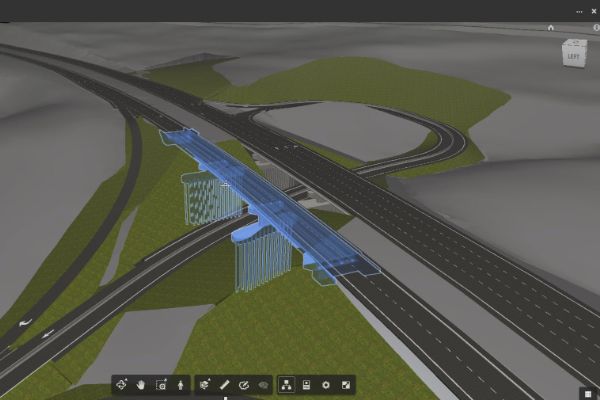
Bring project information together in Autodesk Navisworks. Its viewing and analysis environment lets you combine large models from applications including AutoCAD, Revit and Inventor.
Practical exercises introduce model review and markup, TimeLiner, Animator, Scripter, Quantification, Autodesk Rendering and Clash Detective.
Use Navisworks Simulate and Manage to open, review and quantify 3D models, test object interference, connect scheduling files and produce 4D construction simulations.
Build interactive animations with Animator and Scripter, then explore Autodesk Rendering for realistic still images and animated output.
At the end of the course, you will be able to:
• Describe the main features and functionality of the Autodesk® Navisworks® software.
• Open and append 3D files of different formats and save in the Autodesk Navisworks format.
• Create links to object properties files and scheduling files in external databases.
• Perform visual project model reviews using the built-in review and reporting tools.
• Create construction simulations of a project model to check validity of construction schedules.
• Use Animator and Scripter to create interactive animations for presentations and demonstrations.
• Obtain 2D and 3D take off data from source models to create material estimates, measure areas, and count components.
• Perform interference detection tests between 3D files of different disciplines to check integrity of the design.
• Add true-to-life materials, lighting, and Environments to project models, to create photorealistic output.
BENEFITS OF Navisworks Manage TRAINING

Clash Detection and Resolution

Improved Project Coordination

Advanced Reporting and Data Analysis
Risk Mitigation
View Course Content
DAY 1
CHAPTER 1: GETTING STARTED
- Getting Started with Autodesk Navisworks.
- Publishing, Merging, Refreshing, and Emailing Files.
- Selection Tree and Selecting Objects.
CHAPTER 2: 3D MODEL REVIEW
- Hiding Objects and Overriding Materials
- Project Properties
- Measuring and Moving Objects
- Selection and Search Sets
- ViewportsComments, Redlining, and Tags
- Animations
- Sectioning
- Links
- Comparing Models
- Navisworks Real-Time Rendering
- Switchback
CHAPTER 3: TIME LINER
- Time Liner Overview
- Creating Task
- Gantt View
- Import Tasks from External Project File
- Configuring and Defining a Simulation
- Simulation Export
CHAPTER 4: ANIMATOR
- Animator Overview
- Creating a Basic Animation
- Manipulate Geometry Objects in an Animation Set
- Section Plane Sets
- Controlling Animation Scene Playback
DAY 2
CHAPTER 5: SCRIPTER
- Scripter Overview
- Creating and Managing Scripts
- Item and Resource Management
- 3D Model and Virtual Take Off
- Managing Take Off Data
- 2D Take Offs
- Analyzing Changes
- Exporting take Off Data
CHAPTER 6: QUANTIFICATION
- Quantification Overview
- Setting Up a Quantification Project
- Item and Resource Management
- 3D Model and Virtual Take Off
- Managing Take Off Data
- 2D Take Offs
- Analyzing Changes
- Exporting Take Off Data
CHAPTER 7: CLASH DETECTIVE
- Clash Detective Overview
- Clash Results
- Clash Test Reporting
- Working with Clash Test
- Audit Checks
- Exporting and Importing Clash Tests
- Laser Scan Data Clashing
- Methods for Testing and Resolving Clashes
- Time-Based Clashing
CHAPTER 8: AUTODESK RENDERING
- Autodesk Rendering Overview
- Adding Materials to a Model
- Creating and Editing Materials
- Material Mapping
- Lighting
- Sun and Skylights
- Exposure Control
- Ground Planes
- Photorealistic Rendering
A good place to start.
Tell us what you would like to learn or how you would like to collaborate. Our team will help with the next step.
Ready for your next step?
Let’s find the right training for you or your team.
