
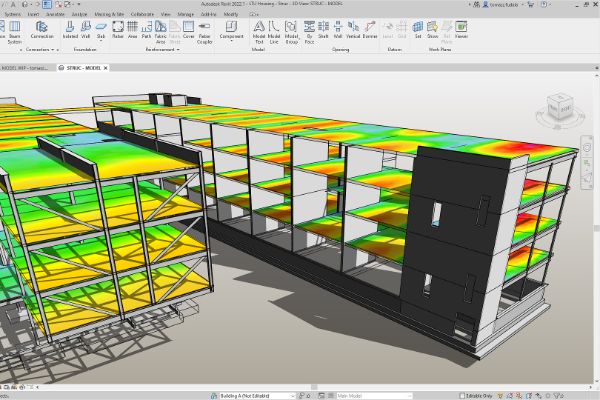
Learn the BIM principles that connect structural building design with construction documentation in Autodesk Revit Structure.
Get to know the interface and core structural components, then use the tools needed to create, document and print a parametric model. Exercises draw on a variety of building types.
This course is designed for new users of Revit Structure.
Courseware Objectives
Develop familiarity with the software’s interface and structural components while practising the creation, modification, analysis and documentation of parametric models.
BENEFITS OF Revit Structure Essentials TRAINING

Familiarity with Revit's structural tool

Improved collaboration and coordination

Accurate analysis and design

BIM (Building Information Modeling) expertise
View Course Content
DAY 1
CHAPTER 1: INTRODUCTION TO BIM AND AUTODESK REVIT
- Building Information Modeling
- Overview of the Interface
- Standard Terminology
- Starting Projects
- Viewing Commands
CHAPTER 2: BASIC DRAWING & EDITING COMMANDS
- Using General Drawing Tools
- Editing Elements
- Working with Basic Modify Tools
- Working with Additional Modify Tools
CHAPTER 3: SETTING UP LEVELS AND GRIDS
- Setting Up Levels
- Creating Structural Grids
CHAPTER 4: CONCRETE STRUCTURE
- Start a Structural Project
- Create Foundation Elements
- Frame a Concrete Structure
CHAPTER 5: ADDING COLUMNS AND WALLS
- Placing Structural Columns
- Placing Slanted Structural Columns
- Modeling Walls
- Modifying Walls
CHAPTER 6: ADDING FOUNDATIONS
- Creating Wall Footings
- Adding Isolated Footings
- Creating Piers and Pilasters
CHAPTER 7: ADDING CONCRETE SLABS
- Creating Concrete Slabs
- Vertical Opening
- Creating Shaft Openings
DAY 2
CHAPTER 8: VERTICAL CIRCULATION
- Creating Structural Stairs
- Modifying Structural Stairs
- Sketching Custom Stairs
CHAPTER 9: WORKING WITH DOORS AND WINDOWS
- Create Model with walls, windows and doors (Openings)
CHAPTER 10: STARTING STRUCTURAL PROJECTS
- Linking and Importing CAD Files
- Linking in Revit Models
- Copying and Monitoring Elements
- Coordination Review
CHAPTER 11: STRUCTURAL FRAMING
- Modeling Structural Framing
- Modifying Structural Framing
- Modifying Beam System
CHAPTER 12: ADDING STRUCTURAL SLAB
- Creating a Slab on Grade
- Adding a concrete Floor with Steel Decking
- Cantilevering Slab Edges
- Creating thickened Slabs
- Creating Slab Depressions
CHAPTER 13: STEEL BRACE FRAMES
- Adding a brace frame elevation
- Adding a brace frame
- Adding Brace-frame gussets
CHAPTER 14: TRUSSES
- Adding Howe Trusses
- Attaching trusses roofs
- Changing truss materials
- Editing truss chord
DAY 3
CHAPTER 15: THE STEEL CONNECTION
- Configuration the steel connection settings
- Adding a base plate
- Adding a clip Angle
- Adding a Column support
- Adding a plate and bolts
CHAPTER 16: STRUCTURAL REINFORCEMENT
- Structural Reinforcement
- Adding Rebar
- Modifying Rebar
- Reinforcing Walls, Floors, and Slabs
CHAPTER 17: ANNOTATING CONSTRUCTION DOCUMENTS
- Working with Dimensions
- Working with Text
- Adding Tags
- Adding Detail Lines and Symbols1
- Creating Legends
CHAPTER 18: CREATING DETAILS
- Setting Up Detail Views
- Adding Detail Components
- Annotating Details
CHAPTER 19: SCHEDULING
- Structural Schedules
- Graphical Column Schedules
- Working with Schedules
- Creating Schedules
CHAPTER 20: CREATING CONSTRUCTION DOCUMENTS
- Setting Up Sheets
- Placing and Modifying Views on Sheets
- Printing Sheets
A good place to start.
Tell us what you would like to learn or how you would like to collaborate. Our team will help with the next step.
Ready for your next step?
Let’s find the right training for you or your team.
